
noreply-comment@blogger.com
Have you ever left a question in the comment section on someone else's blog and wondered why they never responded back to you? Most bloggers do respond to questions, you know. A lot of bloggers will respond even if you haven't left a question!
Well, your question may have been left out in the the cold because
you may be one of those dreaded

and you didn't even know it!!
I've been known to track people who have left me questions all the way back to their Etsy shops. They probably think I'm stalking them! But I would rather them think that than think I am not interested in answering their questions.
To check and see if you are a "NOREPLY", or if you know you are but don't know how to fix it, here is the simple way to go about getting this remedied.
NOTE: This is not an original tutorial. I know its been posted several times in blogland. But maybe the more bloggers that let you know how to do this, the more likely you are to fix it. It can be very frustrating to not be able to communicate with you!
STEP 1
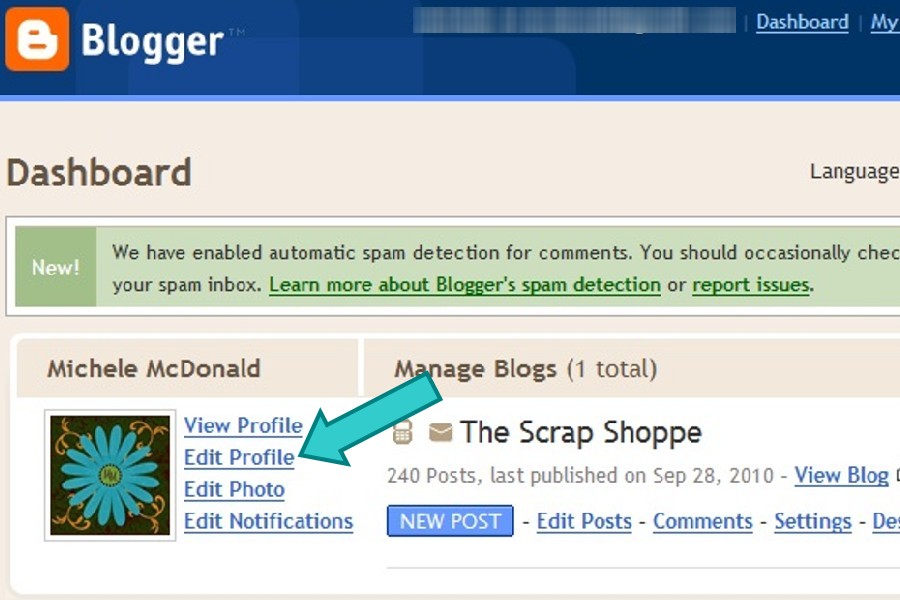
Go to your dashboard.
Not sure how to get there?
Click on the orange Blogger icon in the top left corner of your blog.
Click on Edit Profile.
STEP 2

Under Privacy, check the Show My Email Address box.
STEP 3
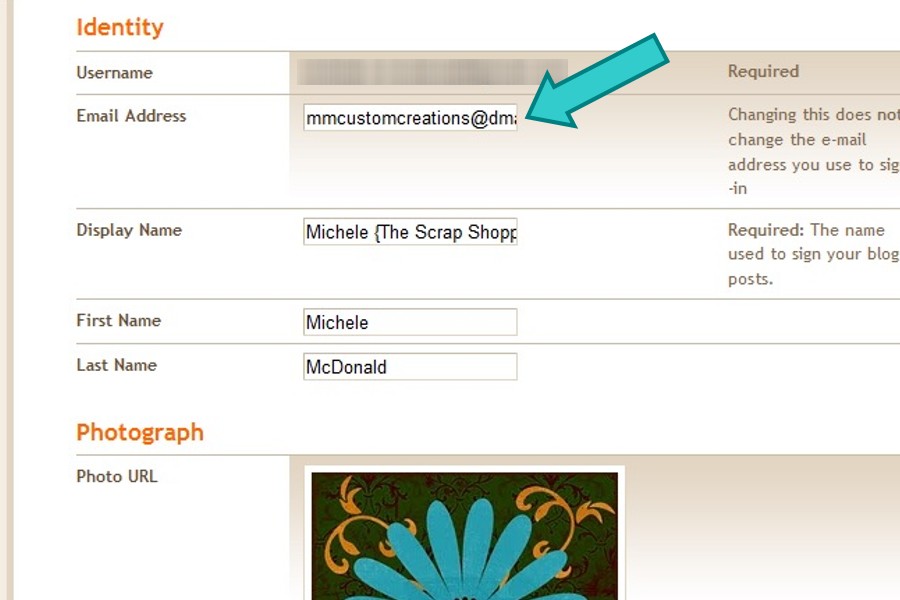
On the SAME PAGE, scroll down to the Identity section.
Enter the email address that you want to receive comment responses to.
IT DOES NOT HAVE TO BE THE SAME EMAIL ADDRESS AS YOUR BLOGGER LOGON.
STEP 4
Scroll down to the bottom of the page and hit Save Profile.
That's it!!
So what do you think? Easy peasy?
Are you going to make sure you're not a "NOREPLY"?
I hope so!





Oh my gosh! I have never been able to figure out how to fix this! Thanks!!!
Wow! I had no idea. Thanks for the tips!!!
Thanks alot!! I've been wondering how to change this!! lol 🙂
I had no idea. Thank you so much!
Thanks! I've been wondering how to fix that. Twice now I've had two sweet bloggers track me all the way back to my blog to reply because they couldn't email me as they didn't have access to my email from my reply. Now it should be fixed, yay!
Ah! Thank you so much for posting this. I'm frequently frustrated by commenters that I can't reply back to...come to find out... I'm one of them! I had no idea. So glad I checked and followed your instructions to change that!
Thank you! I am no longer a no-reply commenter which is something I've wanted to change for a while.
How do I reply to comments left on my blog through e-mail?
Good write-up... Thansk for sharing it.
OOOOOHHHH MMYYY GOOOOODNESSS!!! I am literally laughing out loud right now. This whole time I was thinking people must really dislike me & my comments because so many people never answer my questions or respond to my comments. THANKS for this post! My world has been turned right side up again, and I am totally doing a happy dance 😀
Thanks for posting this..
Thanks! Mine was not set up properly, but I've fixed it!
Hi Michelle,
Please can you clarify something for me? If I have my email showing in the box can people see the email address on the comment I leave them?
Kind regards
Lynn
Thanks so much for posting this. My friend has been bugging me to fix this, but I didn't know how. Thank you, thank you, thank you!
I believe this refers to commenting by e-mail, not leaving a comment on someone's blog (am I correct?)Someone left me a comment and said that my blog was set for no reply - confusing.
Thanks for the info. I'm going to check my profile.
Ann
OK so I changed mine, thanks so much for posting this...but I do have a question(thank goodness you will be able to reply to me)...if someone does leave me a comment that I want to reply to, how is that done...I don't see anything that says reply...do I click on their picture or what? thanks
Thank you SO much for posting this!! I am hoping that I have it set up right!!
Thanks for posting this! I double-checked mine and my email was showing, but I have several times wanted to email a reader but couldn't!
Thanks, I may link back to this, soon, from my blog:) I have my email available, but many of my commenters don't:(
How about the fabulous "can't comment in embedded comment boxes" problem. The funny thing is, after many bloggers having this problem for several years, Blogger still has not addressed it. The only so called help out there for this problem uses embedded comment boxes!
Am I a noreply? I don't really understand this issue since I have had people reply and I don't have my email visible. Is it only a certain type of comment?
This can be so frustrating! I like to reply to everyone who comments (my blog is very small though, so I'm able to do that)... but it's hard when they don't leave a way to contact them! Anyway, it's great to see someone putting this out there!
Thanks for posting this. I agree that the more of us who share this, the better. I get some wonderful comments that I'd love to respond to and can't and it gets challenging to keep up with finding the commenters blog, going to it, leaving a comment. I try but when pressed for time ....
Oh my goodness! By checking on this, I discovered that my profile was not even enabled! Thanks for the tips, Michele! 🙂
Thank you for posting this because I just had someone leave a comment that I wanted to respond to and they left no way for me to answer them. 🙁
No way?! I just discussed this in a post I scheduled for this afternoon! You read my mind! I'm going to direct readers to this tutorial. Thanks, my friend!